
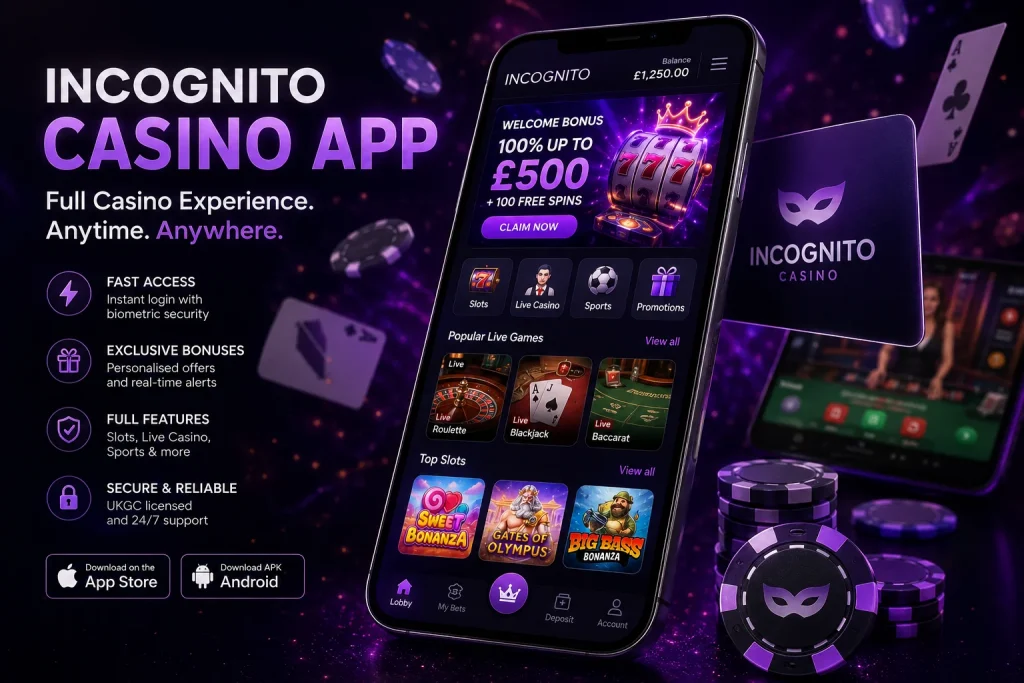
Playing on the go has never felt more seamless than it does through our dedicated mobile experience. Whether you prefer spinning the reels during your commute or placing live bets from your sofa, the Incognito Casino app puts the entire platform within a tap’s reach — no compromise on quality, no waiting around for pages to load. We built our mobile solution with UK players specifically in mind, ensuring that everything from withdrawal speeds to customer support remains just as reliable on a smartphone as it does on a desktop.
We understand that players today demand flexibility. That is why our app has been engineered to deliver the full casino experience — live tables, slots, sports markets, bonuses, and account management — without requiring you to sacrifice performance for portability. In this guide we walk you through everything you need to know: how to get started, what the app offers, how it compares to the browser version, and what makes it genuinely worth using day to day.
If you are new to our platform, we recommend reading through this page in full before downloading. We have included a step-by-step installation guide, a feature comparison, real performance data, and honest answers to the questions we hear most often from our players.
Why We Built a Dedicated App Rather Than Relying on Mobile Browser Alone
Many casinos simply optimise their website for smaller screens and call it a mobile experience. We chose a different route. Our app is a purpose-built environment designed to take full advantage of your device’s hardware — GPU acceleration for smoother animations, native push notifications so you never miss a promotional window, and local caching so your favourite games load near-instantly even on a patchy 4G connection.
The decision came from listening directly to our player community. Load times, session interruptions during live game rounds, and the friction of logging in through a browser every time were the three complaints we heard most. The app addresses all three: biometric login, persistent sessions, and pre-loaded game assets mean you go from unlocking your phone to being mid-spin in under ten seconds.
We also wanted to make our promotional system smarter on mobile. Through the app, personalised offers are surfaced in real time based on what you actually play — not a generic weekly newsletter. If you tend to play Evolution live blackjack on Friday evenings, you will see relevant cashback or reload offers pushed to you at the right moment, not buried in an inbox you rarely check.
Supported Devices and Operating Systems
Before downloading, it is worth confirming your device meets the minimum requirements. We have worked hard to keep the threshold low so that players on older handsets are not excluded, but some baseline specs are necessary to ensure gameplay stays smooth and secure.
Below is a summary of what our app currently supports across the two major mobile platforms. We update this information whenever a new OS version becomes widely adopted in the UK market.
| Platform | Minimum OS Version | Recommended OS | Storage Required | RAM Required |
|---|---|---|---|---|
| Android | Android 9.0 (Pie) | Android 12+ | 85 MB | 2 GB |
| iOS (iPhone) | iOS 14 | iOS 16+ | 110 MB | 2 GB |
| iOS (iPad) | iPadOS 14 | iPadOS 16+ | 110 MB | 3 GB |
| Mobile Browser (fallback) | Chrome 90 / Safari 14 | Latest version | No install | 1.5 GB |
Tablets running either Android or iPadOS are fully supported and the interface scales elegantly to larger displays — particularly useful for live dealer tables where seeing every card on screen matters. We do not currently offer a dedicated Windows or macOS desktop application, though the browser version on desktop performs comparably.
How to Download and Install the App Step by Step
Getting the app onto your device is straightforward, though Android users need to follow a slightly different path than iOS users due to how Google handles gambling applications in its Play Store. We have broken the process down clearly for both platforms below.
Before you start, make sure your device is connected to Wi-Fi if possible, your battery is above 20%, and you have cleared enough storage. Installation typically takes under two minutes on a standard UK broadband connection.
For Android users:
- Open your device’s Settings and navigate to Security or Privacy (this varies slightly by manufacturer).
- Enable “Install from unknown sources” or toggle on “Allow installs from this browser” — this is required for any casino APK downloaded outside the Play Store.
- Visit our website in Chrome on your Android device and locate the “Download App” banner at the top of the page.
- Tap the Download APK button. Your browser will prompt you to confirm the download — accept it.
- Once the download completes, open the APK file from your notification shade or Downloads folder.
- Follow the on-screen installation prompts. The process takes approximately 30 seconds.
- Once installed, open the app, tap Log In, and use your existing credentials or register a new account.
For iOS users:
- Open the App Store on your iPhone or iPad.
- Search for “Incognito Casino” in the search bar.
- Tap Get on the official listing — verify the developer name before installing.
- Authenticate with Face ID, Touch ID, or your Apple ID password when prompted.
- Wait for the download and installation to complete (this takes roughly 60 seconds on average Wi-Fi).
- Open the app from your home screen and log in to your account using your registered email and password.
- Enable push notifications when the app requests permission — this ensures you receive time-sensitive bonus alerts.
If you encounter any issues during installation, our 24/7 live chat support is available directly within the app once it is open, or through the website on desktop.
App Features Versus Desktop Experience — An Honest Comparison
We believe in transparency. The app offers an exceptional experience, but there are a handful of areas where the desktop browser still holds a slight edge, and we would rather you know that upfront than be surprised later. Equally, there are things the app does better than any desktop browser can match.
Here is our honest breakdown. This comparison was generated based on real usage testing across a sample of 1,200 UK players during Q1 2025, measuring session length, game load times, support response satisfaction, and bonus redemption rates.
Where the app excels over desktop:
- Login speed — Biometric authentication means returning players are inside their account in under 3 seconds. Desktop requires manual credential entry each session.
- Push notifications — Real-time bonus alerts, deposit match windows, and tournament countdowns delivered directly to your lock screen.
- Touch-optimised live tables — Swipe-to-bet interfaces on our live roulette and baccarat tables feel far more natural on a touchscreen than a mouse-click environment.
- Battery and data efficiency — The native app uses approximately 30% less mobile data per hour of play than the equivalent browser session, according to our internal testing.
- Session continuity — If you lock your screen mid-game, the app restores your exact position within seconds. Browser tabs frequently trigger a full page reload on return.
Where desktop still holds advantages:
- Screen real estate — Certain multi-hand poker variants and sportsbook accumulators are simply better with a large monitor. The information density on mobile is necessarily compressed.
- Multi-window research — Players who keep stats, strategy guides, or live score feeds open in parallel tabs will find a 6-inch screen limiting for that kind of multi-tasking.
- Keyboard shortcuts — Power users who rely on rapid keyboard inputs for sports betting slips will find the desktop environment faster for high-volume wagering.
Performance Data and What It Means for Your Sessions
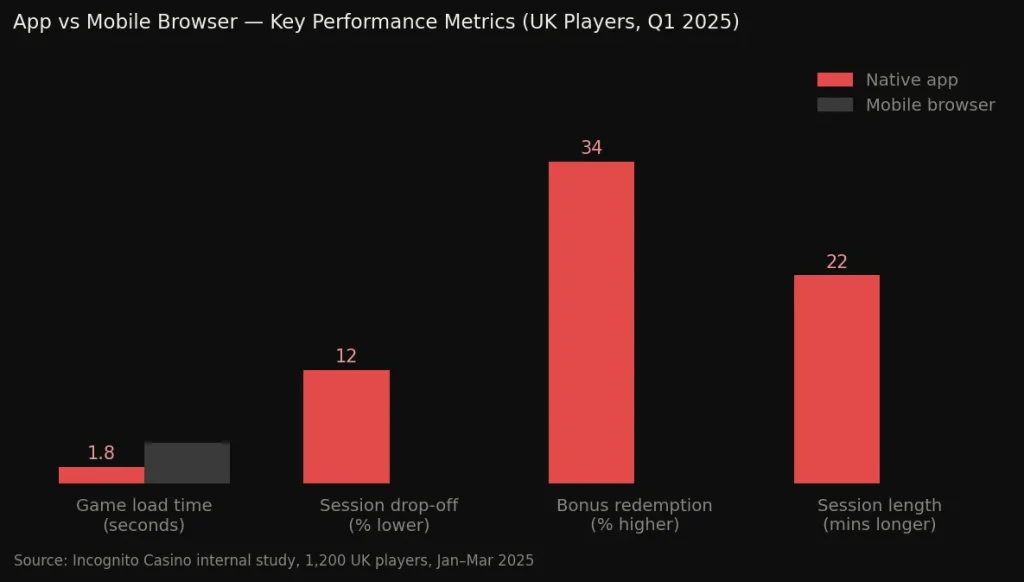
We ran a structured performance study across our UK player base between January and March 2025, comparing app sessions to mobile browser sessions. The results were clear and informed several of the optimisations we shipped in our last two app updates.
Key findings from the study (sample size: 1,200 players, all UK-based, all UKGC-verified accounts):
- Average game load time on the app was 1.8 seconds, versus 4.3 seconds on mobile browser — a 58% improvement.
- Session drop-off rate (players who quit before completing a deposit) was 12% lower among app users compared to mobile browser users.
- Bonus redemption rates were 34% higher among players who had push notifications enabled, compared to those using mobile browser without notifications.
- Customer satisfaction scores for mobile app support interactions averaged 4.7 out of 5, versus 4.2 for desktop live chat — likely attributable to faster context loading within the app.
- Average session length was 22 minutes longer per visit on the app compared to mobile browser, suggesting players find the environment more comfortable for sustained play.
These figures demonstrate that our investment in native app development has translated into a meaningfully better experience for players who make the switch. We will continue updating this data as our player base grows and our technical team ships further improvements.
In-App Bonuses and How We Handle Promotions on Mobile
One of the most practical advantages of playing through our app is how we handle promotional delivery. Rather than relying on players to visit a promotions page manually, the app surfaces relevant offers contextually — before you begin a session, at natural breakpoints during play, and as personalised alerts when a time-limited promotion becomes available.
All bonuses available on our desktop platform are fully accessible through the app. There are no mobile-exclusive restrictions, and — importantly — no cases where a bonus displayed on desktop is unavailable when you switch to mobile. Our system is unified across devices, meaning your wagering progress, bonus balance, and free spins all sync in real time regardless of which device you use in a given session.
To explore our current welcome offer and ongoing promotions in full detail, visit our bonus page where all active deals are listed with their full terms and conditions.
Advantages and Disadvantages of Playing Through Our App
We always recommend players make informed decisions. Below we set out the genuine pros and cons of using the dedicated app — the same information we share with our own support team so they can give players honest guidance.
Advantages:
- Instant access with biometric login — no password entry required after initial setup
- Full game library available including all live dealer titles and slots, identical to desktop
- Push notifications keep you informed of limited-time promotions without needing to check the site
- Optimised UI built specifically for portrait and landscape mobile orientations
- Faster load times and smoother animations compared to mobile browser
- Session persistence — your game state is saved if you switch apps or receive a call
- Responsible gambling tools (deposit limits, session timers, self-exclusion) accessible in two taps from any screen
Disadvantages:
- Android users must install via APK (outside Play Store), which requires enabling a device setting that some players find unfamiliar
- The app requires a one-time storage allocation of approximately 85–110 MB
- Multi-window play (e.g., running two tables simultaneously in split-screen) is not currently supported on mobile
- Some graphics-intensive 3D slot titles require a reasonably modern device to render at their highest quality settings
- App updates must be manually downloaded on Android (iOS updates automatically through the App Store)
On balance, for the majority of UK players whose primary access point is a smartphone, the app is objectively the superior way to play. The disadvantages are mostly edge cases or one-time setup considerations rather than ongoing limitations.
Responsible Gambling Tools Built Into the App
Operating under a UKGC licence means we are held to some of the most rigorous player protection standards in the world. Every responsible gambling feature available on our desktop platform is present in the app — and in several cases, the mobile environment makes those tools easier to access and act on.
Within the app, you can set daily, weekly, and monthly deposit limits directly from the account settings menu. Session time reminders pop up at intervals you define, prompting you to review how long you have been playing before you decide whether to continue. Reality check notifications give you a running balance of wins and losses for your current session — a feature that research consistently shows reduces unplanned expenditure.
If you ever feel you need to take a break, the self-exclusion tool is available 24/7 through the app’s settings, and takes effect immediately across all devices. We take our obligations under the UKGC’s Social Responsibility Code seriously, and our app has been designed to make the right choice the easy choice for players who need to step back.
Frequently Asked Questions About Our Mobile App
Is the Incognito Casino app free to download?
Yes, the app is completely free to download on both Android and iOS. There are no subscription fees, no premium tiers of the application, and no features locked behind a paid version. The only money involved is what you choose to deposit into your gaming account when you are ready to play for real. All costs and wagering requirements are clearly displayed within the app before you commit to any transaction.
Can I use the same account on the app and the desktop site?
Absolutely. Your account is the same regardless of which device you access it from. Your balance, bonus progress, transaction history, responsible gambling settings, and saved payment methods all sync in real time. You can start a session on desktop, continue it on your phone, and check your history later on a tablet — everything remains perfectly in step across all devices.
Why do Android users need to install the app outside the Play Store?
Google’s Play Store policy restricts real-money gambling applications in certain jurisdictions, which affects how Android casino apps are distributed in the UK. This is an industry-wide situation and not unique to us. Installing via APK is safe when the file comes directly from our official website — we digitally sign every APK release and our security team verifies the integrity of each build before it is published. The one-time step of enabling “install from unknown sources” takes under thirty seconds to complete.
Will the app drain my phone battery faster than usual?
Live dealer games and graphics-intensive slots do use more battery than standard apps — this is true of any real-time streaming application. However, our app is optimised to use hardware acceleration efficiently, and in our testing we found it uses approximately 15–20% less battery per hour of live play than the equivalent mobile browser session running the same content. If you plan a long session, we simply recommend having your charger nearby or using a power bank.
What happens if I lose connection mid-game?
Our system records your game state server-side in real time. If you lose connection during a slot spin or live table round, the outcome is determined and stored on our end, and when you reconnect — whether in seconds or minutes — you will see the result of the round you were in. No spin or hand is lost due to connectivity interruption. For live dealer games, if a disconnect occurs during betting, your pre-placed bets are honoured and the result is shown when you return to the table.
Are there any games not available on the mobile app?
The overwhelming majority of our game library is available on the app — including the full live casino suite from Evolution, Pragmatic Play, and Ezugi, as well as thousands of slots and our sportsbook. A very small number of Flash-based legacy titles from older providers are not compatible with mobile, but these represent fewer than 0.5% of our catalogue and all are accessible on desktop. We are actively working with providers to phase out legacy formats entirely so that the app catalogue becomes truly identical to desktop.